
These days, with improvements in technology & of course the benefits of low cost compared to prices 10 or 20 years ago, there does seem to be a trend to using helmet or bike mounted camera’s to record your motorcycle adventure on film with some on board footage or of course using a camera for peace of mind on your journey as a bike alternative to using car dash cams.
 Dash cams are all the rage with many car drivers seeking a bit of added safety on the road should they get involved in road accident, then there is video evidence to support any claim, however please be aware some insurance companies have been rumored to refuse dash cam footage claiming that digital footage can be easily edited or manipulated with PC software. With bikes it’s no exception with many riders now fitting camera’s to their bikes for the same reasons as car drivers, but always ask your insurance company if they accept digital footage if in doubt.
As the summer biking season is just around the corner, many riders though simply just want to clip on a video camera & take to the roads to get that road trip on video for posterity, maybe for recording the fun at trackdays or if you are someone who races bikes perhaps you want to record your victories… whatever the reasons, you will find most who take an onboard camera do this simply for home viewing or to upload to YouTube or similar sites such as Vimeo or Daily Motion etc, or just to share with friends via social media. With this in mind many of the biker forums & chat websites are often littered with people asking questions about video cameras so we hope you will find this guide useful.
- What type of camera should i buy?
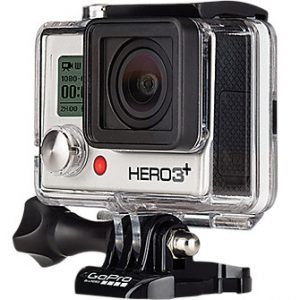
 This comes down to personal preference & budget. At the top end of the market you can buy “Action Camera’s” such as GoPro camera’s which cost anything between £200-£500 & are now used by many TV companies for in car or on bike footage, although for around half the cost or far less (around £40 – £100) you can buy similar action camera’s of a compatible standard from brands such as Vivitar, Polaroid or SJCam from the likes of Argos, Amazon, Tesco or of course auction sites such as eBay. These are usually mounted with a quick release clip fitting & can be housed inside a totally waterproof protective plastic casing with protruding buttons so you can use the camera in the rain & not have to take it out of the case to operate & the case will also help eliminate a lot of the wind noise. Usually these can be fitted practically anywhere on the bike or on the body & there is a huge selection of fitting brackets & mounts available for any application.
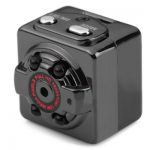 If you only have a small budget (£30 or less) or maybe prefer something a little more discrete & aren’t particularly worried about broadcast quality footage, take a look at cheaper camera’s often branded as spy cameras such as the SQ8, the MD80 or the 808 keyfob camera, however these will need mounting with custom made ties or clips & often need to be kept out of the weather such as rain or high wind as they are not weatherproof. Also it may be mindful that many digital stills camera’s also have a video mode or of course if you can, why not just use the camera on your smartphone so all you may need is to purchase a mounting bracket & you can use what you have got. Most camera’s feature USB charging & have rechargeable batteries installed inside or clipped to the back which will need to be charged before use but some will require the use of AA or AAA batteries. Whatever camera you buy, make sure it can be removed & stored away from prying eyes if you leave your bike or the camera unattended.
 - Will i need a memory card, if so what memory card will i need?
With most digital camera’s you will need a good quality Class 10 Micro SD card as the video will be stored direct to a card which you will have to purchase separately. Ideally one with sufficient memory will be needed (16gb should be a minimum for most uses of any digital video camera) as a 5 minute journey recorded on film can take up around 500mb of space on a memory card, so in reality one 32gb card should be able to offer you at least 30 minutes of recording time with the video set on the highest quality setting to give broadcast quality HD video.
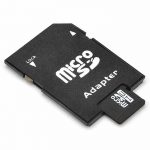 My own personal recommendation is to perhaps carry 2 or 3 cards with you for long journeys’s or if you are limited to one, record only in a standard definition format. Remember you can also use editing software once you get home to change or compress the format in file size without losing hardly any video quality.
Also when buying Micro SD cards, be aware there are many cheap ones out there & also plenty of unbranded cards or branded cards which are cloned copies of high quality ones, sold on internet sites or car boot sales etc for just a few quid being sourced usually from sellers based in China which when you put the card into a PC reader or camera will show as the 32GB card you purchased for example, when in reality it is most likely a basic 4gb card that has been overclocked, so once you get beyond that 4GB capacity the camera will continue to record, but the footage will become corrupted & as is the way, by then you will not be able to return the card for a replacement or refund. Always buy reputable brands such as Sandisk, Fuji, Samsung, Lexar, Kingston etc & if possible buy only from a reputable source or a supermarket or retailer that is part of a large chain or specialist local camera retailer who can advise you on what’s best. It may cost you more, but you shouldn’t lose any footage. - How do i mount the camera, where’s the best place?
This comes down to preference. Many riders are mounting camera’s to the top or side of their helmet for that pure riders eye viewpoint or if you prefer you can opt to go for a dramatic racing style footage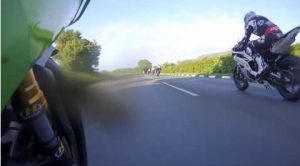 position that you often see on TV coverage of the big motorcycle races with the camera mounted at the side of a fairing to look across the front wheel looking ahead, behind the fairing screen looking out or if you prefer with the camera facing you if you want to evaluate you own riding techniques. Wherever you put the camera often will depend on what mounts you have or need to buy. The GoPro type shoe mounts can be bought fairly easily from many camera shops or on Amazon or eBay & will also work with many other camera’s which can be easily adapted to use them. Typically there are 2 types of mounting to secure the camera itself.. the adjustable mount with quick release clip fitting which locks into a shoe base that is usually secured with strong double sided tape or screws that will be standard with most GoPro camera’s or the more photographic industry standard 1/4inch screw type camera mount fitting used for mounting stills camera’s on tripods which can be easily converted to a normal GoPro type clip fitting so you can use the GoPro shoe mounts. If using a screw type mount, it may also be wise to buy a locking nut to stop the camera spinning on the mounting or vibrating loose when in motion.
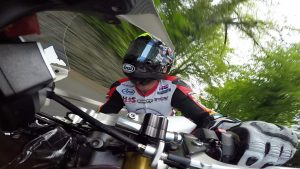 You can also buy clamp fittings, these are similar to the way you would mount bicycle lights to the pipework of the bicycle frame or have a belt or strap which can be used for mounting direct to the frame, top of the forks, grab rail or handlebar of your bike. Most action camera’s come with a clamp fitting supplied in the box. Some camera’s mounts come with a rubber suction cup mount but be careful where you place it as it has to be secured properly & not liable to fall off due to a poor surface to achieve proper suction or work loose due to vibration. You can get short retaining straps to stop the camera hitting the ground should it ever come unmounted.
It’s also perhaps worth highlighting at this point, that the closer to the ground that you mount the camera it will make the speed seem faster, so for instance traveling at 30mph with a camera fixed to the bottom of the fairing will appear on screen to be much faster than a camera mounted to the top of a crash helmet at the same speed. Good tip if you want to make your video’s look more dramatic or have that feeling of speed. - How can i add a commentary or edit the footage?
 Digital camera editing software is often included with many camera’s on the installation CD so it’s always worth having a browse at the CD that came with the camera in the packaging. Of course you can use a package such as Windows Movie maker although on newer Windows 10 installations, Movie maker doesn’t come as a standard
feature so you will have to obtain a copy from the Microsoft website or seek an alternative. There are plenty of guides on how to use video editing software online or on YouTube.
Many video editing programs feature a function to add additional audio to play in the background of your videos, so maybe you want to add your favourite MP3 track (maybe even Molly Hackett’s Flirtin’ with Disaster , Bad to the Bone 0r some Steppenwolf) for visual effect or add a commentary to your fastest laps, this is often very simple to do by dragging & dropping the audio file or recording the audio direct using the software & a PC microphone & then export the entire video to a format you can watch such as Mp4, AVI, MPEG or direct to a Video CD or DVD image to burn to CD/DVD later. - How do i upload the footage online or store it to watch at home?
 Plug the camera into a PC or Laptop using the supplied USB lead (if that’s how your camera works) or remove the Micro SD card & use an SD card reader view files or to transfer files to a PC, laptop, Tablet or even a smartphone. Most video’s can be uploaded direct to YouTube or similar sites, even social media without the need to convert the format to a standard type. You may still need to edit the clips for time as sometimes you will be limited to 10 minute clips when uploading to some video websites or just a few minutes on social media. The original files can then be stored for safe keeping by burning them in a data format to a blank CD later or can kept on your PC or laptop. If your CD burning software doesn’t offer a DVD recording format (should you want to watch your clips on your home DVD player, you may need to use a purpose built editing package such as DVD flick or a more professional package such as Leawo DVD creator to create an ISO file to burn later. Some video file formats can’t be read by some PC or laptop software & some media players that may only play the audio, so you will need to install other software however i recommend simply installing VLC media player onto your PC or laptop (it’s freeware) as this plays every video format i’ve tried myself so far.